# Connection & setup
Connect a WhatsApp Business Account to a profile through Meta's Embedded Signup or a System User token, choose coexistence or Cloud API only, and set the business profile customers see.
import { Tab, Tabs } from 'fumadocs-ui/components/tabs';
By the end of this page, a WhatsApp number is connected to a profile and you have its `accountId`.
## Cloud API only or coexistence
Every route ends on Meta's Cloud API through Embedded Signup or a System User token. No route pairs a browser session to a phone the way WhatsApp Web does.
- **Cloud API only** (`onboarding=api`) runs entirely in the browser.
- **Coexistence** keeps the number in the WhatsApp Business app and adds one step on the phone: the user scans a QR code Meta shows during signup ([coexistence](#whatsapp-business-app-coexistence)).
## Before you start
You need an API key, a profile id ([create a profile](/profiles/create-profile)) and a Meta Business account at [business.facebook.com](https://business.facebook.com). The WhatsApp Business Account (WABA) can be created during the flow.
Three rules apply whichever route you take:
- **Several numbers per profile.** A profile can hold several WhatsApp numbers, each its own account. A number can be live on one profile only.
- **A Zernio-provisioned number is pinned to its profile.** Connect it from the profile it was bought for; any other profile gets a `409`. Move it first with `PATCH /v1/whatsapp/phone-numbers/{id}/profile` if it should live elsewhere.
- **Coexistence is the default.** Unless you pass `onboarding=api`, Embedded Signup offers to keep the number in the WhatsApp Business app, which limits the API ([coexistence](#whatsapp-business-app-coexistence)).
## Step 1: Choose the number
Any number in a WABA can be connected. Where it comes from decides what else it can do:
| Number | How it connects | Calls and SMS |
|---|---|---|
| Bought or ported through Zernio | Embedded Signup; the number is pre-verified and appears as **Verified** in Meta's picker | Yes, on the same number |
| Your own number on your own carrier | Embedded Signup, or [credentials](#connect-with-credentials-headless) | No; it has no Zernio line behind it |
Buying, porting, per-country pricing and KYC are on the [Phone numbers](/platforms/phone-numbers) pages. The WhatsApp-specific rules for a number are on [WhatsApp phone numbers](/platforms/whatsapp/phone-numbers).
A purchase starts this flow by itself, because `connectWhatsapp` defaults to `true` on [`POST /v1/phone-numbers/purchase`](/platforms/phone-numbers/setup).
## Step 2: Start Embedded Signup
Call `GET /v1/connect/whatsapp` with `profileId`, `redirect_url` and `onboarding`.
The response is a URL where the user runs Meta's Embedded Signup: log in to Meta, create or pick a WABA, pick a phone number.
The same redirect flow connects every platform. No Facebook JavaScript SDK is needed, and it works from any domain.
```typescript
import Zernio from '@zernio/node';
const zernio = new Zernio();
const profileId = '66a1f0c2a4b9d3e8f1a2b3c4';
const { data: connect } = await zernio.connect.getConnectUrl({
path: { platform: 'whatsapp' },
query: { profileId, redirect_url: 'https://myapp.com/callback', onboarding: 'api' }
});
console.log(connect.authUrl);
```
```python
from zernio import Zernio
client = Zernio()
profile_id = "66a1f0c2a4b9d3e8f1a2b3c4"
connect = client.connect.get_connect_url(
platform="whatsapp",
profile_id=profile_id,
redirect_url="https://myapp.com/callback",
onboarding="api",
)
print(connect["authUrl"])
```
```bash
curl "https://zernio.com/api/v1/connect/whatsapp?profileId=66a1f0c2a4b9d3e8f1a2b3c4&redirect_url=https://myapp.com/callback&onboarding=api" \
-H "Authorization: Bearer $ZERNIO_API_KEY"
```
Response (`200`):
```json
{
"authUrl": "https://www.facebook.com/v21.0/dialog/oauth?client_id=...",
"state": "..."
}
```
`onboarding` picks the screen Meta shows:
| `onboarding` | Meta shows | Result |
|---|---|---|
| `api` | The WABA and number picker | Cloud API only. Use it for a Zernio-provisioned number, a number already on Cloud API elsewhere, or whenever you need [groups](/platforms/whatsapp/groups) or [calling](/platforms/whatsapp/calling). |
| `business_app` (default when omitted) | "Connect existing WhatsApp Business app" | Coexistence: the number stays in the app and works on the API with the limits below. |
Send the user's browser to `authUrl`. When they finish, they land on `redirect_url` with the connection appended:
```
https://myapp.com/callback?connected=whatsapp&profileId=66a1f0c2a4b9d3e8f1a2b3c4&accountId=66b2e19d8c3f5a7e9d0b1c2d&username=%2B13105551234
```
`accountId` is the id every WhatsApp call takes from here on.
If Embedded Signup fails, the browser lands on the same `redirect_url` with `error` and `platform` appended. The WhatsApp values are:
- `whatsapp_error`
- `one_whatsapp_per_profile`
- `whatsapp_number_already_connected`
- `whatsapp_number_pinned_to_profile`
- `connection_cancelled`
When the user's Facebook login can reach more than one number, this flow ends on a Zernio number picker (or, with `headless=true`, on your own).
To skip that second choice, use the [hosted signup](#hosted-embedded-signup-the-number-preselected) below.
### Headless mode: pick the number yourself
WhatsApp grants access per WABA.
When the WABA the user picked holds 2 or more numbers, a headless flow (`headless=true` on the call above) sends the user to your `redirect_url` with `step=select_phone_number`, `profileId` and `tempToken`.
A single-number WABA connects in the callback and never reaches this step.
List the numbers with `GET /v1/connect/whatsapp/select-phone-number`, show your own picker, then bind one:
```typescript
const params = new URL(requestUrl).searchParams; // requestUrl: the URL your handler received
const tempToken = params.get('tempToken')!;
const { data: numbers } = await zernio.connect.listWhatsAppPhoneNumbers({
query: { profileId, tempToken }
});
const chosen = numbers.phoneNumbers[0];
const { data: selected } = await zernio.connect.completeWhatsAppPhoneSelection({
body: { profileId, phoneNumberId: chosen.id, wabaId: chosen.wabaId, tempToken }
});
console.log(selected.account.accountId);
```
```python
from urllib.parse import parse_qs, urlparse
query = parse_qs(urlparse(request_url).query) # request_url: the URL your handler received
temp_token = query["tempToken"][0]
numbers = client.connect.list_whats_app_phone_numbers(
profile_id=profile_id,
temp_token=temp_token,
)
chosen = numbers["phoneNumbers"][0]
selected = client.connect.complete_whats_app_phone_selection(
profile_id=profile_id,
phone_number_id=chosen["id"],
waba_id=chosen["wabaId"],
temp_token=temp_token,
)
print(selected["account"]["accountId"])
```
```bash
curl "https://zernio.com/api/v1/connect/whatsapp/select-phone-number?profileId=66a1f0c2a4b9d3e8f1a2b3c4&tempToken=$TEMP_TOKEN" \
-H "Authorization: Bearer $ZERNIO_API_KEY"
curl -X POST "https://zernio.com/api/v1/connect/whatsapp/select-phone-number" \
-H "Authorization: Bearer $ZERNIO_API_KEY" \
-H "Content-Type: application/json" \
-d '{
"profileId": "66a1f0c2a4b9d3e8f1a2b3c4",
"phoneNumberId": "1875844705851813",
"wabaId": "317766992490131",
"tempToken": "'"$TEMP_TOKEN"'"
}'
```
The list returns the numbers across the user's WABAs.
Response (`200`):
```json
{
"phoneNumbers": [
{
"id": "1875844705851813",
"display_phone_number": "+1 310-555-1234",
"verified_name": "Acme Corp",
"quality_rating": "GREEN",
"name_status": "APPROVED",
"messaging_limit_tier": "TIER_1K",
"wabaId": "317766992490131",
"wabaName": "Acme WABA"
}
]
}
```
The selection binds the number, exchanges the short-lived token for a long-lived one and subscribes the WABA to webhooks.
Response (`200`):
```json
{
"message": "WhatsApp phone number connected successfully",
"account": {
"accountId": "66b2e19d8c3f5a7e9d0b1c2d",
"platform": "whatsapp",
"username": "+1 310-555-1234",
"displayName": "Acme Corp",
"isActive": true,
"selectedPhoneNumber": "+1 310-555-1234"
}
}
```
### Hosted Embedded Signup: the number preselected
Meta only tells a page that opened its popup which WhatsApp account and number the user picked. The redirect flow above gets an authorization code and nothing else.
That is fine for a user whose Facebook login manages one WhatsApp account: the callback finds one number and connects it.
A user whose login manages several accounts (agency staff, a multi-brand owner) sees every number that login can reach. They pick once in Meta's popup and again in the picker.
Add `signup=hosted` to the same call, and `authUrl` becomes a page on zernio.com instead of Meta's dialog.
That page opens Meta's popup itself, learns the number the user picked, connects exactly that one, and sends the user on to your `redirect_url`.
Nothing to embed on your side, no Facebook SDK, no domain to register.
```typescript
const { data: connect } = await zernio.connect.getConnectUrl({
path: { platform: 'whatsapp' },
query: { profileId, redirect_url: 'https://myapp.com/callback', onboarding: 'api', signup: 'hosted' }
});
// Send the user's browser here; it is a zernio.com page, not Meta's dialog.
console.log(connect.authUrl);
```
```python
connect = client.connect.get_connect_url(
platform="whatsapp",
profile_id=profile_id,
redirect_url="https://myapp.com/callback",
onboarding="api",
signup="hosted",
)
print(connect["authUrl"])
```
```bash
curl "https://zernio.com/api/v1/connect/whatsapp?profileId=66a1f0c2a4b9d3e8f1a2b3c4&redirect_url=https://myapp.com/callback&onboarding=api&signup=hosted" \
-H "Authorization: Bearer $ZERNIO_API_KEY"
```
Response (`200`):
```json
{
"authUrl": "https://zernio.com/connect/whatsapp/embedded-signup?profileId=66a1f0c2a4b9d3e8f1a2b3c4&redirect_url=https%3A%2F%2Fmyapp.com%2Fcallback&connect_token=...&onboarding=api",
"state": "..."
}
```
The user taps one button on that page and completes Meta's popup. They land on `redirect_url` with the same parameters as the redirect flow, plus the short-lived `connect_token` the page used:
```
https://myapp.com/callback?connected=whatsapp&profileId=66a1f0c2a4b9d3e8f1a2b3c4&accountId=66b2e19d8c3f5a7e9d0b1c2d&username=%2B13105551234&connect_token=...
```
On failure the user lands on `redirect_url` with `error` and `platform=whatsapp`. It carries the same values and extras as the redirect flow:
- `one_whatsapp_per_profile`, `whatsapp_number_already_connected` and `whatsapp_number_pinned_to_profile` (with `is_user_fixable=true`)
- `payment_required` (with `reason` and `dashboard_url`)
- `whatsapp_error`, with Meta's own reason in `error_message` when it reported one
Two values are specific to this flow:
- `connection_cancelled` when the popup was closed before finishing. `error_message` carries Meta's last step or error when there is one.
- `session_expired` when the user took longer than the 60 minutes the page stays valid for. Call `GET /v1/connect/whatsapp` again to restart.
`onboarding` works as above, and a Zernio-provisioned number is attached like on the redirect flow.
`headless` has no effect here, because there is no selection step left to hand you.
Under the hood the page calls `POST /v1/connect/whatsapp/embedded-signup` ([Connect from Embedded Signup](/connect/connect-whatsapp-embedded-signup)) with the `wabaId` and `phoneNumberId` Meta reported. You never call it yourself.
#### What the user sees
The page shows the same guidance as the Zernio dashboard, so nobody is left guessing inside Meta's popup:
- **Pre-verified Zernio number** (a number you provisioned through Zernio for this profile): the page names it ("+1 657 366 2058 is ready, no code will be asked") and tells the user to pick exactly that entry from Meta's number list, with a short video showing where it appears.
- **Coexistence** (`onboarding=business_app` or omitted): a 2-minute video of the QR pairing from the WhatsApp Business app.
- **Standard signup** (`onboarding=api`): a short video of the portfolio and account selection.
Once the popup opens, the page turns into a step-by-step follow-along checklist (log in, pick the number, choose the portfolio, and so on). It stays visible next to Meta's window.
#### Branding
The page carries the Zernio logo (it is co-branded, not white-label).
It takes three optional parameters on the same `GET /v1/connect/whatsapp?signup=hosted` call. They are stored on the signup session when the link is issued, so nothing in the page URL can change them.
| Parameter | Effect | Rules |
| --- | --- | --- |
| `brandName` | Page title becomes "Connect your WhatsApp number to *brandName*" | 1 to 60 characters, trimmed |
| `primaryColor` | Primary button and step accents | Hex `#RRGGBB` |
| `language` | Page and checklist copy (videos stay in English) | `en` (default), `es` or `pt-BR` |
```bash
curl "https://zernio.com/api/v1/connect/whatsapp?profileId=66a1f0c2a4b9d3e8f1a2b3c4&redirect_url=https://myapp.com/callback&signup=hosted&brandName=Trama&primaryColor=%231D4ED8&language=es" \
-H "Authorization: Bearer $ZERNIO_API_KEY"
```
These return a `400` (`invalid_field_value` naming the parameter):
- any of the three without `signup=hosted`
- a colour that is not `#RRGGBB`
- a language other than `en`, `es` and `pt-BR`
There is no logo parameter.
## WhatsApp Business app coexistence
A business that already uses the WhatsApp Business app can keep the number there and connect it to the Cloud API at the same time.
Embedded Signup offers this when `onboarding` is `business_app` or omitted.
The number then works in both places:
- Messages are mirrored between the app and the API (up to 6 months of history is synced).
- Contacts from the app are imported.
- The business can keep sending individual messages from the app.
This route needs the phone in the room.
1. The user enters the number and confirms the business details. Meta shows a QR code in the Embedded Signup window.
2. The user opens the WhatsApp Business app and taps the camera icon at the top right to scan it, or scans it from Settings > Linked devices.
3. The user confirms the account details back in the browser.
The number must already be active in the WhatsApp Business app. The consumer WhatsApp app does not qualify.
The Cloud API-only route has no scan step.
Coexistence changes what the API can do on that number:
| Feature | On a coexistence number |
|---------|--------|
| Throughput | Fixed at 20 messages per second |
| Groups created in the app | Not synced; not visible through the API |
| [Groups API](/platforms/whatsapp/groups) | Not supported. Needs a Cloud API-only number |
| Voice and video calls | Not supported through the API |
| Disappearing messages | Turned off for all 1:1 chats |
| View once messages | Disabled for all 1:1 chats |
| Broadcast lists | Disabled in the WhatsApp Business app |
| Profile photo | Locked; manage it in the app |
Everything else uses the same endpoints as a Cloud API-only number.
`message.sent` carries `source: "whatsapp_business_app"` for sends made from the phone, so you can tell them from API sends.
**Leaving coexistence.** Meta has no API to take a number out of coexistence. The business disconnects on the phone:
```
WhatsApp Business app > Settings > Account > Business Platform > Disconnect
```
Meta notifies Zernio and the account is deactivated. An [`account.disconnected`](/webhooks/accounts/account-disconnected) event fires within seconds with Meta's own reason ([how detection works](/webhooks/accounts#how-disconnect-detection-works)).
Meta's notification is best-effort, so never read the absence of that event as proof the channel is alive. Confirm with the [liveness check](/platforms/whatsapp/phone-numbers#liveness-check).
Then reconnect the number with `onboarding=api`, or with [credentials](#connect-with-credentials-headless), and the Groups API is available.
## Connect with credentials (headless)
If you hold Meta credentials already, connect without a browser. This suits server-to-server integrations, CLI tools and automated provisioning.
1. Create a System User in [Meta Business Suite](https://business.facebook.com/settings/system-users).
2. Generate a permanent token with `whatsapp_business_management` and `whatsapp_business_messaging`. Add `whatsapp_business_manage_events` for [Click-to-WhatsApp conversions](/platforms/whatsapp/ctwa#conversions-api-for-business-messaging).
3. Copy the WABA id and phone number id from WhatsApp Manager > Account Tools > Phone Numbers.
Call [`POST /v1/connect/whatsapp/credentials`](/connect/connect-whatsapp-credentials) with `profileId`, `accessToken`, `wabaId` and `phoneNumberId`. Add `pin` when the number has two-step verification on; without it Meta rejects the registration.
```typescript
const { data: credentials } = await zernio.connect.connectWhatsAppCredentials({
body: {
profileId,
accessToken: 'EAABsbCS...your-system-user-token',
wabaId: '317766992490131',
phoneNumberId: '1875844705851813',
pin: '481902'
}
});
console.log(credentials.account.accountId);
```
```python
credentials = client.connect.connect_whats_app_credentials(
profile_id=profile_id,
access_token="EAABsbCS...your-system-user-token",
waba_id="317766992490131",
phone_number_id="1875844705851813",
pin="481902",
)
print(credentials["account"]["accountId"])
```
```bash
curl -X POST https://zernio.com/api/v1/connect/whatsapp/credentials \
-H "Authorization: Bearer $ZERNIO_API_KEY" \
-H "Content-Type: application/json" \
-d '{
"profileId": "66a1f0c2a4b9d3e8f1a2b3c4",
"accessToken": "EAABsbCS...your-system-user-token",
"wabaId": "317766992490131",
"phoneNumberId": "1875844705851813",
"pin": "481902"
}'
```
Response (`200`):
```json
{
"message": "WhatsApp connected successfully",
"account": {
"accountId": "66b2e19d8c3f5a7e9d0b1c2d",
"platform": "whatsapp",
"username": "+1 310-555-1234",
"displayName": "Acme Corp",
"isActive": true,
"phoneNumber": "+1 310-555-1234",
"verifiedName": "Acme Corp",
"qualityRating": "GREEN"
}
}
```
Zernio validates the credentials against Meta, creates the account, subscribes the WABA to webhooks and registers the number on the Cloud API.
When `phoneNumberId` is not in the WABA, the `400` lists `availablePhoneNumbers` so you can correct it.
Any callback URL you had configured on this WABA stops receiving events at once, with no overlap window. Do not unsubscribe your app from the WABA afterwards.
Connecting subscribes your Meta app to this WABA with a callback override that routes its webhook delivery to Zernio. Unsubscribing also cuts off Zernio's delivery, and recovery means calling this endpoint again.
## Business profile
The business profile is what customers see when they open your number in WhatsApp.
Read it with `GET /v1/whatsapp/business-profile`. Change it with `POST /v1/whatsapp/business-profile`; only the fields you send are updated.
`about` is at most 139 characters, `description` at most 512, and `websites` holds at most 2 entries.
```typescript
const { data: profile } = await zernio.whatsapp.getWhatsAppBusinessProfile({
query: { accountId }
});
console.log(profile.businessProfile.about);
await zernio.whatsapp.updateWhatsAppBusinessProfile({
body: {
accountId,
about: 'Widgets, shipped the same day',
description: 'Acme sells widgets to workshops in 40 countries.',
email: 'hello@example.com',
websites: ['https://example.com']
}
});
```
```python
profile = client.whatsapp.get_whats_app_business_profile(account_id=account_id)
print(profile["businessProfile"]["about"])
client.whatsapp.update_whats_app_business_profile(
account_id=account_id,
about="Widgets, shipped the same day",
description="Acme sells widgets to workshops in 40 countries.",
email="hello@example.com",
websites=["https://example.com"],
)
```
```bash
curl "https://zernio.com/api/v1/whatsapp/business-profile?accountId=66b2e19d8c3f5a7e9d0b1c2d" \
-H "Authorization: Bearer $ZERNIO_API_KEY"
curl -X POST https://zernio.com/api/v1/whatsapp/business-profile \
-H "Authorization: Bearer $ZERNIO_API_KEY" \
-H "Content-Type: application/json" \
-d '{
"accountId": "66b2e19d8c3f5a7e9d0b1c2d",
"about": "Widgets, shipped the same day",
"description": "Acme sells widgets to workshops in 40 countries.",
"email": "hello@example.com",
"websites": ["https://example.com"]
}'
```
Response (`200`), the read:
```json
{
"success": true,
"businessProfile": {
"about": "Widgets, shipped the same day",
"address": "1 Main St, Springfield",
"description": "Acme sells widgets to workshops in 40 countries.",
"email": "hello@example.com",
"profilePictureUrl": "https://...",
"websites": ["https://example.com"],
"vertical": "RETAIL"
}
}
```
Response (`200`), the update:
```json
{
"success": true,
"message": "Business profile updated successfully"
}
```
The profile picture, display name and WhatsApp username have their own endpoints under [Business profile](/whatsapp/get-whatsapp-business-profile).
On a [coexistence](#whatsapp-business-app-coexistence) number, the picture is locked and managed in the WhatsApp Business app.
## Scopes
Embedded Signup requests these scopes; the [scopes section](/guides/connecting-accounts#scopes) of the connecting guide explains how they are granted and checked.
| Scope | What it enables |
|-------|-----------------|
| `whatsapp_business_messaging` | Send and receive messages |
| `whatsapp_business_management` | Manage WABA assets: templates, phone numbers, settings |
| `whatsapp_business_manage_events` | Conversions API events and CTWA dataset provisioning |
| `business_management` | Discover WABAs owned by your Meta Business during connection |
A System User token you mint yourself carries only the permissions you assigned; Zernio cannot extend it.
## From the dashboard
The same flow runs from [Connections](https://zernio.com/dashboard) when you connect by hand: open the **WhatsApp** card, click **+ Connect**, then choose **Get a new number** or **Use my own number**.
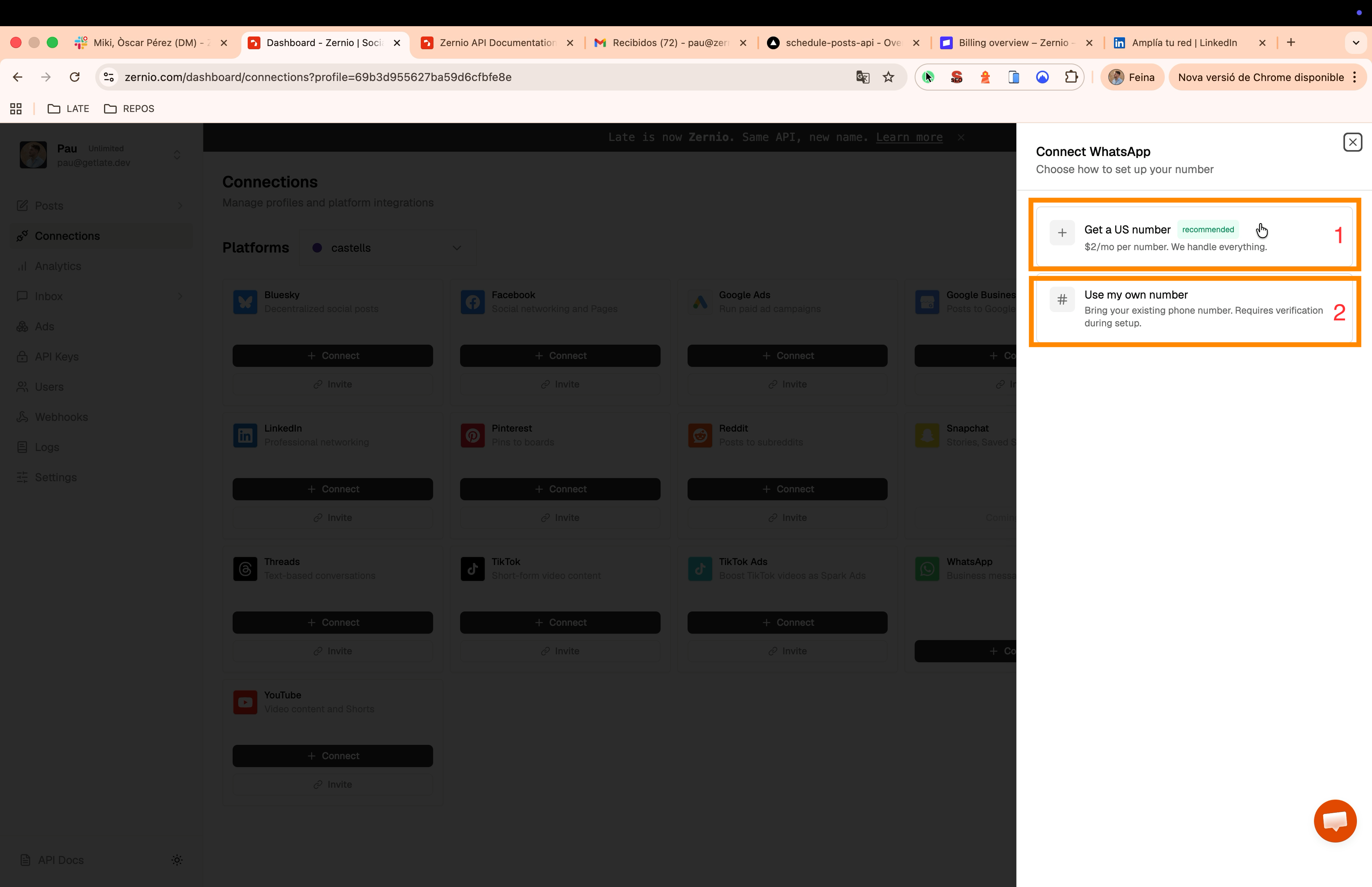
A new number asks for a country. The [price per country](/platforms/phone-numbers/availability) shows before you confirm.
- US and other instant countries verify in about 30 seconds.
- Regulated countries need a one-time [KYC form](/platforms/phone-numbers/kyc) first. The number activates within 1 to 3 business days, with an email and the [`whatsapp.number.activated`](/webhooks/whatsapp/whatsapp-number-activated) event when it is ready.
**Continue to WhatsApp setup** hands over to Meta's Embedded Signup, where you create or pick a WABA and then select the number, already marked **Verified**.
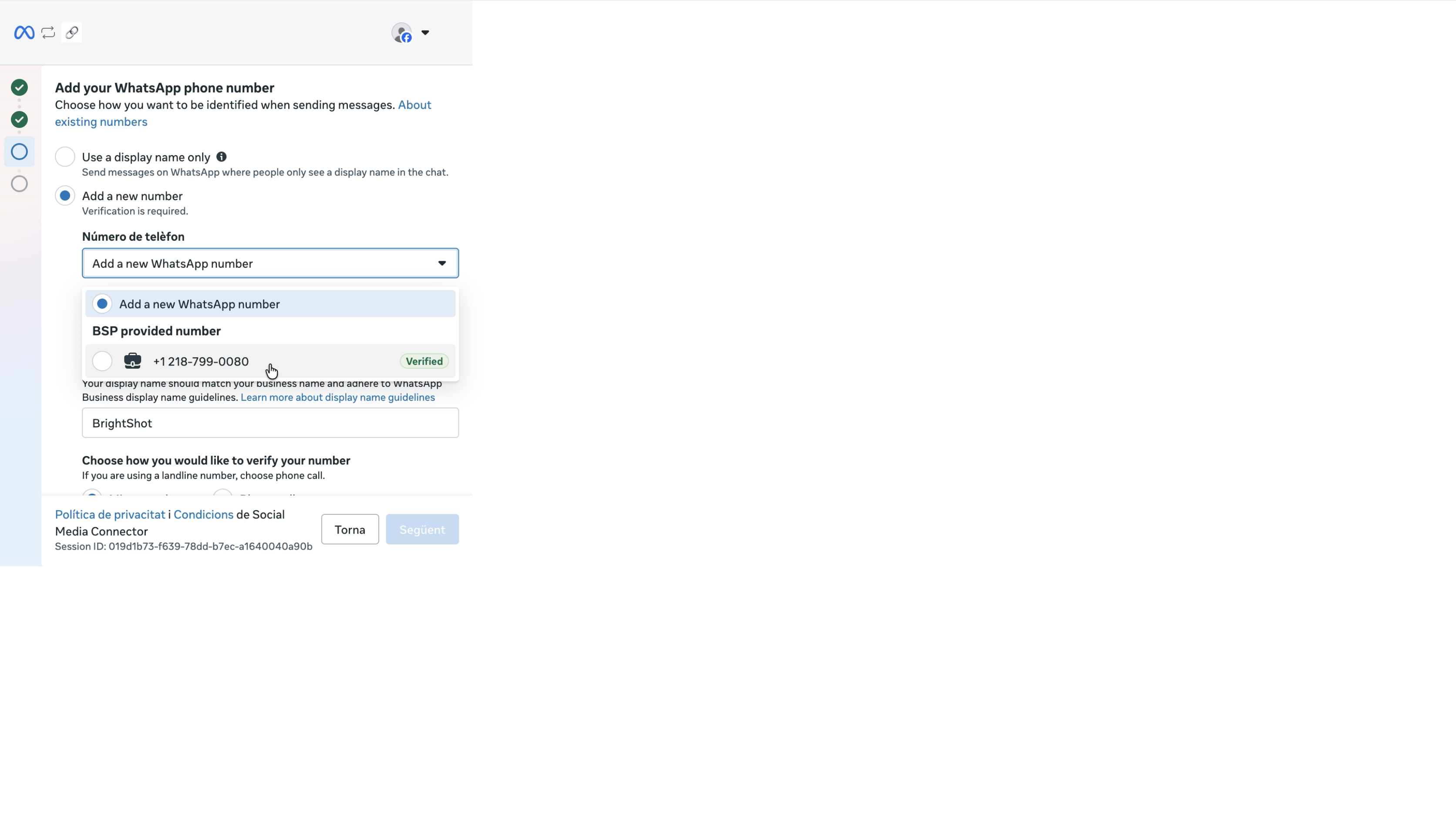
In Meta's window, skip **Connect existing WhatsApp Business app account** if you need the [Groups API](/platforms/whatsapp/groups) or calling: it activates [coexistence](#whatsapp-business-app-coexistence), which disables both. Create a new WABA or pick a number outside the WhatsApp Business app.
The account then shows as **connected** in Connections, where **Settings** opens the [templates](/platforms/whatsapp/templates) list and the **Business Profile** tab edits the fields above.
## If it fails
A `409` from the credentials or selection call means the number is already spoken for. `code` says which rule it hit:
| `code` | Meaning | Fix |
|---|---|---|
| `ONE_WHATSAPP_PER_PROFILE` | The profile already holds a WhatsApp number | Connect this number to a different or new profile |
| `WHATSAPP_NUMBER_PINNED_TO_PROFILE` | A Zernio-provisioned number pinned to another profile | Connect from that profile, or move it first with `PATCH /v1/whatsapp/phone-numbers/{id}/profile` |
| `WHATSAPP_NUMBER_ALREADY_CONNECTED` | The number is live on another profile or team | Disconnect it there first |
The redirect flow reports the same three as `error=one_whatsapp_per_profile`, `whatsapp_number_pinned_to_profile` and `whatsapp_number_already_connected` on your `redirect_url`.
A `402` is a billing gate, described in [connecting accounts](/guides/connecting-accounts#if-it-fails).
**After connecting.** A number that sends `(#200) You do not have the necessary permission` on every message has a two-step PIN Meta rejected. Register it again with the PIN on [WhatsApp phone numbers](/platforms/whatsapp/phone-numbers#verification-with-meta).
## Related
- [WhatsApp phone numbers](/platforms/whatsapp/phone-numbers): number status, the liveness check, registering with a PIN.
- [Phone numbers](/platforms/phone-numbers): buy, port, KYC, per-country pricing.
- [Connecting accounts](/guides/connecting-accounts): the redirect flow and headless mode shared by every platform.
- [Templates](/platforms/whatsapp/templates): the first thing to create after connecting.
- [Group chats](/platforms/whatsapp/groups): why a Cloud API-only number matters.